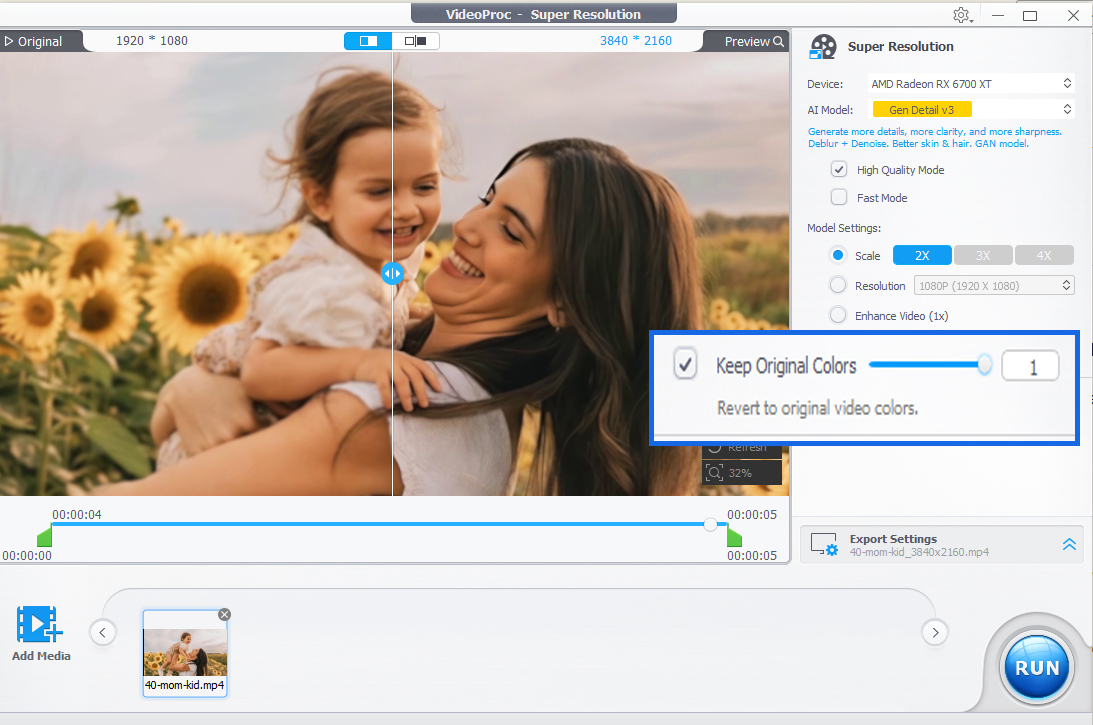
VideoProc Converter AI V8.11 introduces a new Keep Original Colors option to help enhance video quality with improved color consistency in AI Super Resolution.
CHENGDU, SICHUAN, CHINA, May 18, 2026 /EINPresswire.com/ — Digiarty Software has released VideoProc Converter AI V8.11, an important update focused on helping users enhance video quality with more natural and consistent colors during AI-powered video upscaling and enhancement. The update introduces a new “Keep Original Colors” option for AI Video Super Resolution, allowing users to preserve colors closer to the original source video when processing footage with AI enhancement models such as Gen Detail V3 and Real Smooth V3.
The update is now available for both existing and new users worldwide. In addition to improving color consistency in AI upscaling, V8.11 also adds NVIDIA TensorRT support to the Frame Interpolation engine to improve compatibility and resolve usability issues experienced by some users: https://www.videoproc.com/video-converting-software/
Developed by Digiarty Software, a leading multimedia software company specializing in AI-powered video, image, and media processing technologies, VideoProc Converter AI is an all-in-one AI-based video enhancer and converter designed to help users enhance video quality, upscale videos, stabilize shaky footage, restore old videos, increase frame rates, reduce noise, convert media formats, and process videos efficiently with GPU acceleration.
The Growing Demand to Enhance Video Quality with AI
AI Video Super Resolution has become one of the most important technologies for users seeking to enhance video quality from old footage, compressed online videos, anime, low-resolution recordings, security camera clips, smartphone videos, and archived media. By reconstructing details frame by frame using deep learning models, AI upscaling can turn blurry or pixelated footage into sharper and higher-resolution (4K) videos.
However, improving sharpness is only one part of the challenge.
One of the lesser-discussed technical barriers in AI video enhancement is maintaining color consistency after super resolution processing. During AI reconstruction, models may unintentionally introduce slight color shifts, brightness deviations, grayish tones, or skin tone inconsistencies, especially in videos containing human faces, low-light scenes, compressed footage, or mixed lighting environments.
In practical workflows, users may notice that an AI-enhanced video appears slightly dimmer, cooler, or less saturated than the original source, even when the image details are significantly improved. Maintaining accurate source color characteristics while enhancing clarity requires balancing detail reconstruction, denoising, texture generation, and temporal consistency simultaneously.
According to Digiarty Software, the new update addresses this challenge by giving users finer control over color matching behavior during AI Video Super Resolution.
New Keep Original Colors Option Improves Color Matching
With VideoProc Converter AI V8.11, users can now enable the new “Keep Original Colors” option when using AI Video Super Resolution models. In most cases, users do not need to enable the feature manually, as the AI models are already optimized for balanced enhancement. However, for videos that previously showed slight color differences after enhancement, particularly videos containing human faces, they can simply tick the option and adjust the slider from 0 to 1 to fine-tune color matching. Higher slider values apply stronger color matching and generally produce colors closer to the original video source.
Broader AI Performance and Compatibility Improvements
In addition to color consistency improvements, VideoProc Converter AI V8.11 also expands AI processing compatibility through NVIDIA TensorRT support for the Frame Interpolation engine.
The update improves compatibility and resolves an issue where some users were previously unable to access or use the Frame Interpolation module properly. By integrating TensorRT support, the software can better leverage NVIDIA GPU acceleration environments for smoother AI processing workflows.
Building a More Complete AI Video Enhancement Ecosystem
The V8.11 release continues Digiarty Software’s broader expansion of AI-powered media enhancement technologies inside VideoProc Converter AI.
In a previous major update, the software introduced new AI face restoration capabilities within its Image AI module, adding three distinct facial restoration models designed for different enhancement scenarios:
• Fidelity: Focused on accurately restoring facial contours and details while preserving original facial characteristics.
• Rebuild: Designed to balance realism and detail reconstruction across different expressions, lighting conditions, and poses.
• GFPGAN: Uses generative facial restoration technology to naturally refine blurred or compressed faces.
These additions reflect the company’s continued investment in AI-powered workflows for users looking to enhance video quality and restore visual content more naturally and efficiently.
Digiarty Software says future updates will continue focusing on AI enhancement quality, processing stability, compatibility optimization, and expanded creative restoration capabilities for both video and image workflows.
Pricing and Availability
VideoProc Converter AI V8.11 is available now for Windows and Mac users.
Existing users can upgrade to the latest version for free. Lifetime subscribers are eligible for free lifetime upgrades and ongoing technical support.
New users can currently receive a 62% discount along with four bonus gifts through the official product page:
https://www.videoproc.com/video-converting-software/enhance-video-quality.htm
About Digiarty Software
Established in 2006, Digiarty Software is a pioneer in multimedia innovation, offering AI-powered and GPU-accelerated solutions for video and image enhancement, editing, and conversion. With its mission to “Art Up Your Digital Life,” the company integrates advanced AI technologies to streamline media processing for professionals and enthusiasts alike. VideoProc, Digiarty’s flagship product, has garnered 5.2 million users across more than 180 countries, reinforcing the company’s role as a leader in digital media innovation.
Viola Nee
Digiarty Software Inc.
+86 28 8513 4884
email us here
Visit us on social media:
LinkedIn
Instagram
Facebook
YouTube
X
How to Enhance Video, Image & Audio Quality with AI (Complete Workflow)
Legal Disclaimer:
EIN Presswire provides this news content “as is” without warranty of any kind. We do not accept any responsibility or liability
for the accuracy, content, images, videos, licenses, completeness, legality, or reliability of the information contained in this
article. If you have any complaints or copyright issues related to this article, kindly contact the author above.

Media gallery